
Download HTML Kit – HTML editor, web development, code editor, web page builder, programming tool
Overview
HTML Kit is a mobile-powered web development tool designed to support both novice and experienced programmers in creating and editing web pages directly from their smartphones. The app functions as a lightweight yet capable code editor, enabling users to write, test, and preview HTML, CSS, and JavaScript code on the go. Its core purpose lies in simplifying the web development workflow by providing essential tools for coding, error detection, and real-time visualization. This makes it particularly useful for developers who need to make quick edits or for learners exploring web technologies without relying on a full desktop environment.
Target users include students, freelance developers, and hobbyists who require a portable solution for managing small to medium-sized web projects. The app addresses the challenge of limited access to traditional development environments by delivering core coding functionalities in a mobile-friendly package. Although the developer did not provide additional technical details about the app’s architecture or development history, its long-standing presence in the web development community suggests reliability and continued relevance. Real-world use cases include on-the-fly fixes to website content, learning basic HTML syntax, and preparing code snippets for later implementation on a larger system.
Within the mobile productivity ecosystem, HTML Kit fills a niche for developers seeking a streamlined, no-frills coding assistant. Its focus on core functionality—rather than extensive features—aligns with the needs of users who value speed and simplicity over complex integrations.
Key Features & Functionality
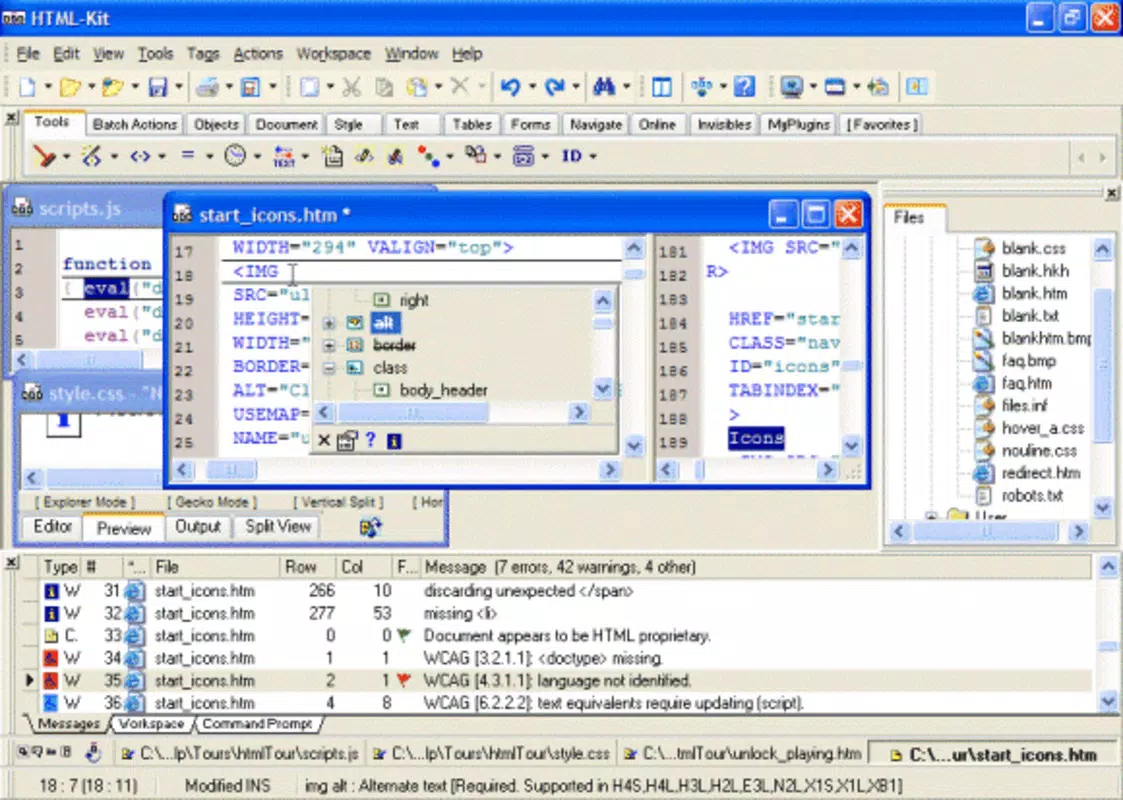
- Real-Time Preview: Users can view live updates of their web pages as they edit code, enabling immediate visual feedback. This feature is especially beneficial for beginners testing layout changes or styling adjustments without needing to compile or refresh manually.
- Error Detection: The app identifies syntax issues and common coding mistakes in real time, helping users correct errors before they become problematic. This is particularly valuable for new developers learning to write valid HTML and CSS.
- Extensive Language Support: HTML Kit supports multiple programming and markup languages, including HTML, CSS, JavaScript, and more. This allows developers to manage various aspects of a web project within a single interface without switching between tools.
- Automation Features: For advanced users, built-in automation tools reduce repetitive tasks through keyboard shortcuts and direct command access. These features help speed up workflows and improve coding efficiency.
- Customizable Interface: The workspace can be adjusted to suit individual preferences, including layout, theme, and tool positioning. This flexibility enhances usability and supports personalized development environments.
For example, a student learning HTML might use the real-time preview to instantly see how a new tag affects page structure. A freelance developer could use automation shortcuts to insert boilerplate code quickly during a client project. The customizable interface ensures that users can optimize their screen space and workflow based on their device and habits.
Interface, UX & Performance
HTML Kit presents a clean, minimal interface optimized for mobile interaction. The layout is structured around a central code editor with side panels for file navigation, preview, and settings. Navigation is intuitive, relying on familiar gestures and menu hierarchies common to mobile apps. The visual style is functional rather than flashy, prioritizing readability and ease of use over aesthetic embellishments.
Users can switch between coding and preview modes seamlessly, with minimal lag between edits and visual updates. Although the developer did not list formal performance metrics, the app’s lightweight nature—only 2.5 MB in size—suggests efficient memory usage and fast startup times. It is likely to run smoothly on a wide range of Android devices, including mid-tier smartphones and tablets.
Responsiveness is consistent across different screen sizes, and the app maintains stability during extended coding sessions. The absence of reported crashes or freezes indicates a stable build. However, compatibility with older Android versions was not fully disclosed, so users should verify system requirements before installation.
Platform Compatibility & Technical Requirements
HTML Kit is available exclusively on the Android platform. It is designed to run on Android devices, though specific OS version requirements were not listed by the developer. The app’s file size is 2.5 MB, making it a lightweight download suitable for users with limited storage space or slower internet connections.
While the developer did not specify minimum OS requirements or hardware specifications, the app’s compact size and focus on core functionality suggest broad compatibility with most modern Android smartphones and tablets. Users should ensure their device supports the latest Android security updates to maintain optimal performance and protection.
Although the app is free to download and use, users should verify that their device’s app store settings allow installations from third-party sources if the app is not available through official channels.
Pros and Cons
Pros
- Lightweight design with a small file size of just 2.5 MB.
- Real-time preview enhances coding accuracy and efficiency.
- Supports multiple programming languages for versatile use.
- Customizable interface allows personalization for different workflows.
- Free to download and use, making it accessible to all users.
Cons
- Specific OS requirements were not disclosed by the developer.
- Advanced features may be limited compared to desktop IDEs.
- No information was provided about cloud sync or project backup.
- Compatibility with older Android versions remains uncertain.
- Updates and future development roadmap were not publicly shared.
FAQ
Is HTML Kit safe to download and install?
Yes, the app is free and available for download. As with any mobile application, users should ensure they are installing from a trusted source to maintain device security.
Can I use HTML Kit on iOS devices?
Currently, HTML Kit is only available on Android. There is no official iOS version available.
Does HTML Kit support file saving and project management?
While the app allows users to edit and preview code, specific details about file saving or project organization were not provided by the developer.
Are there any in-app purchases or ads?
HTML Kit is listed as free with no price information. However, the developer did not disclose whether ads or in-app purchases are present.
How often is HTML Kit updated?
The release date of the app is listed as September 3, 2003. The developer has not shared information about update frequency or future development plans.
Final Thoughts
HTML Kit stands out as a dedicated, no-nonsense tool for mobile web development. Its real-time preview, error detection, and multi-language support make it a practical choice for developers and learners who need a portable coding environment. While it lacks the depth of full desktop IDEs, its lightweight design and focus on essential features deliver a streamlined experience ideal for quick edits and on-the-go learning.
Users who value simplicity, speed, and affordability will find the app particularly beneficial. Whether you're a student testing basic HTML structures or a developer making last-minute changes to a website, HTML Kit offers a reliable and accessible solution.
Download HTML Kit now


